
You may now update a registration status to Arrived directly on the dashboard!
A mark arrived link now appears next to Status column entries in the Today's Arrivals section.
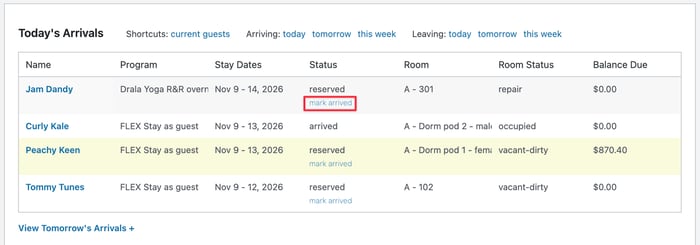
Click on mark arrived when you check in your guest, and the registration status will change to arrived.
On a related note, remember that the room status will automatically change to Occupied only if the mark arrived action occurs on the first day of the stay. If you forget, and click mark arrived after the actual first day, the room status will not auto-update. In that case, you will need to manually update the room status.
We've also added new logic to the automated room status change at the end of a stay. If you change the registration status to Checked out on the final day of the stay, the room status will automatically update to Vacant/Dirty. The new logic checks whether the room status has already been updated to Clean. If it has, no automation will occur - the room status won't change to Vacant/Dirty; it will stay Clean.

